
I was catching up with a friend — CTO at a company with hundreds of employees. Nine-figure ARR. Serious tech company.
Of course he’s familiar with MCPs. His team is building them.
His problem is the chaos.
Everyone experimenting independently. Tinkering, like hobbyists.
Different setups, different tools, no standardization, no way to distribute across the org — to technical and non-technical teammates.
So I explained how I distribute custom MCPs to my team:
- Deploy to Cloudflare Workers
- Secure with Google OAuth
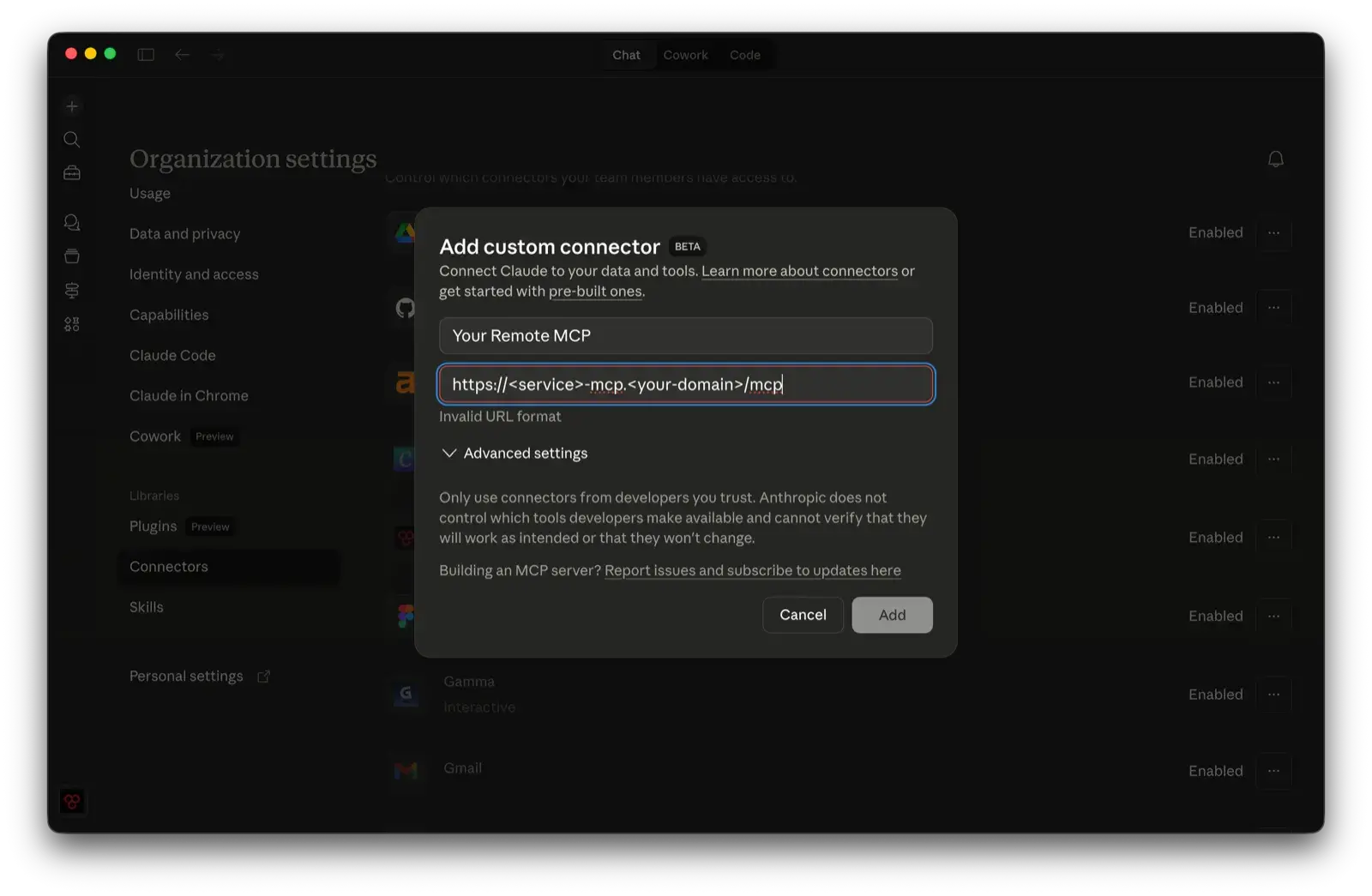
- Add a custom connector to my org’s Claude settings
- Connector becomes available to all org members across Claude
Every team member connects with their work email — and from that point on, your custom tools and data are live inside every Claude conversation.
No local setup. Works for engineers and non-technical teammates alike.
This was my friend’s AHA moment.
“Finally a way to bring order to the chaos.”
It wasn’t the MCP. It was this distribution pattern.
Claude Teams + Cloudflare Workers + OAuth as a way to “productionize” internal systems and push them to the entire org. Not just the engineers. Everyone.
This is the pressure that CTOs and executives are under right now. Drive AI adoption. Keep it secure. Turn scattered experiments into real systems — across coders and the rest of the company.
This pattern is one way to do it.
Why custom MCPs
Most SaaS tools either don’t have an official MCP or ship one that covers a fraction of their API. No multi-account support. No domain-specific logic. No awareness of how your team actually uses the tool.
But the bigger opportunity isn’t patching gaps in official integrations — it’s connecting your internal systems and data that no official MCP will ever reach.
Your data, your tools
- Internal systems — databases, knowledge bases, CRMs, the dashboards your team built in-house
- Cross-system queries — pull from your ticketing system and your analytics platform in a single ask, instead of two tabs and a spreadsheet
- Domain logic — opinionated defaults, business rules, guardrails that prevent mistakes before they happen
Not just for engineers
The people who benefit most aren’t developers.
It’s the PM who can ask Claude a question and get an answer grounded in production data without learning SQL.
It’s the ops lead who can check inventory or revenue without waiting on a report.
You’re not just giving your team new tools — you’re giving them direct access to the information they need to make decisions.
So you build your own. You expose exactly the endpoints your team needs, with your business logic baked in. That’s the easy part.
The hard part is getting it to everyone else. Securely.
The problem with local MCPs
The default MCP setup is local — install Node, clone a repo, configure API keys, run a process. Fine if you’re a developer flying solo.
Now try distributing that to a team:
- Each person needs the right runtime installed
- Each person needs API credentials on their machine — real keys to production services, sitting in plaintext config files on every laptop
- Non-technical team members can’t do any of it
Most teams just don’t bother. The MCPs stay on one person’s machine.
Remote MCP servers fix this
The idea is simple: run your MCP server on Cloudflare Workers instead of locally.
It’s a URL, not a process.
An admin deploys the server once. Adds the connector URL to the organization’s Claude settings. That’s it.
Every team member — across Claude Desktop, Claude Code, and Claude.ai — sees the new integration automatically. They click Connect, sign in with their Google account, and the tools are live.
Claude can now pull data, run queries, and take actions through your MCP — right inside every chat.
No installs. No credentials on their machine. No terminal commands.
Security built in
A remote MCP server without authentication is an open door — anyone who finds the URL can call your tools and burn through your API keys. Google OAuth locks it down:
- Only people in your Google Workspace domain can authenticate
- API keys live in Cloudflare secrets, server-side, never on client machines
- No credentials in config files
- No keys to rotate across every laptop when someone leaves
Team members sign in once with Google. The token refreshes automatically. They forget about it.
What the setup looks like
From the admin side:
- Build the MCP server — define your tools, connect to whatever API you need
- Secure with Google OAuth — create an OAuth app in Google Cloud, restrict it to your Workspace domain, and store the credentials as Cloudflare secrets
- Deploy to Cloudflare Workers
- Add the connector URL to your org’s Claude settings
From the team member side:
- Open Claude, go to Settings → Connectors
- The new integration is already listed — click Connect
- Sign in with Google
- Done — the MCP tools are now available in every conversation
That’s the entire experience. No documentation to read, no setup guide to follow, no Slack thread asking why it’s not working.
What I built
I use this pattern for every MCP I ship, so I turned it into a plugin for Claude Code.
It’s called cf-mcp — it scaffolds the entire project. Templates for the Worker, the OAuth flow, the MCP agent, the API client. A skill that walks Claude through setup, implementation, deployment, and testing end to end.
If you want to try it:
- Plugin:
/plugin install cf-mcp@adamlevoy-plugins - Marketplace:
/plugin marketplace add adamlevoy/claude-plugins - Source: github.com/adamlevoy/claude-plugins/tree/main/plugins/cf-mcp
The pattern works. My team uses it daily.
And the gap between “I built a cool MCP” and “my whole team has secure access” is a single deploy and a URL.